Copy a link, tap a button, done. No need to open the site or Telegram.
iPhone: 3 steps
-
Send
/shortcutto @MoeinimyDL_bot and tap your code to copy it. -
Tap this button, then Add Shortcut, and paste the code:
-
Open Control Center → ➕ at the top left → Add a Control → Shortcut → Moeinimy DL.

If you leave the code empty when adding it, the button opens the site instead and the file downloads to the phone itself. The first time, the iPhone asks to read the clipboard; tap Always Allow.
iPhone: build it by hand, send to Telegram
First: send /shortcut to @MoeinimyDL_bot to get your personal code.
-
Open the Shortcuts app and tap ➕ at the top.
-
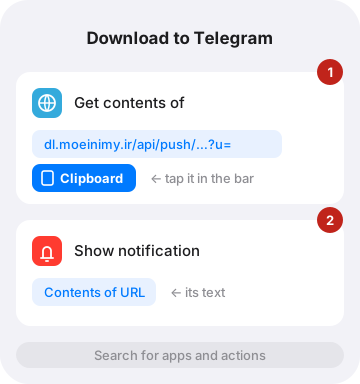
Find the Get Contents of URL action and tap it.
-
Type this address into its blue field, with your code in place of
CODE(if the bot gave you a full link, paste that). Then, at the end of that same field, tap Clipboard in the bar above the keyboard:https://dl.moeinimy.ir/api/push/CODE?lang=en&u= -
Add the Show Notification action and set its text to Contents of URL. It just tells you it was sent.
-
Name it "Download to Telegram" at the top and tap Done.
iPhone: put it in Control Center
- Open Control Center (swipe down from the top-right corner).
- ➕ at the top left → Add a Control → Shortcut → "Download to Telegram".
A notification says it was sent, and a moment later the file is in your Telegram. The first time, the iPhone asks whether the shortcut may read the clipboard; tap Always Allow so it does not ask again.
Control Center takes shortcuts from iOS 18 on. On older iOS: Settings → Accessibility → Touch → Back Tap → Double Tap → your shortcut; two taps on the back of the phone run it.
iPhone: download to the phone itself
If you want the file on the phone instead of Telegram, make a second shortcut. It has one action:
-
➕ → the Open URLs action.
-
Type this address into it and tap Clipboard right after:
https://dl.moeinimy.ir/en/?go=1&q=
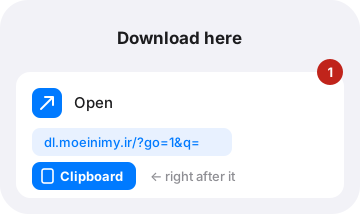
Add it to Control Center the same way. The site opens with that link and starts on its own.
Android
Send to Telegram (simplest): in YouTube, Instagram or any app, tap Share → Telegram → the bot's chat. That is all. After a time or two, Android puts the bot's chat in the first row of the Share menu, so it is one tap.
Download to the phone itself:
- Open this site in Chrome → ⋮ menu → Install app.
- In any app, tap Share and pick Moeinimy DL; the site opens with that link and starts on its own.
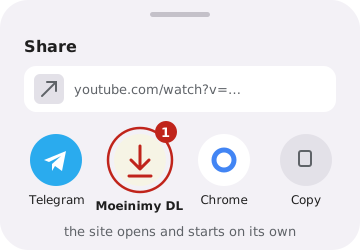
Moeinimy DL is not in the Share menu?
- If you installed the site before, remove it once and install it again; the old version did not have this.
- If Chrome's menu has only Add to Home screen instead of Install app, or the installed icon has a small Chrome logo in its corner, your phone has no Google Play Services or cannot reach Google. Android then makes a plain shortcut that does not appear in Share. Use the Telegram way above.
What is the personal code for?
The shortcut is not signed in to Telegram, so it needs some way to say whose chat the file goes to. That is the personal code: 24 characters that are yours alone, and the bot finds your chat from it.
Keep it to yourself: whoever has it can send links to you. Only that; it gives no access to your account or messages. If it leaks, press "New link" under /shortcut and the old one stops working.
If it does not work
- "There is no link the bot knows in the clipboard": copy the link first. It has to be from a site the bot knows (YouTube, Instagram, TikTok, Spotify, SoundCloud, X, Reddit, Pinterest…).
- "The shortcut's link is old or wrong": get the current link from
/shortcutand change it in the shortcut. - The notification came but no file: you need to have pressed Start in the bot at least once and not blocked it.